Filip Board FAN Control
Windows fan monitoring and opt-in, verified fan control for the Gigabyte Z370 AORUS Gaming 7 (WPF, .NET 8, LibreHardwareMonitor, SQLite). Read-only by default.
Portable single-exe Windows admin console.
Portable single-exe Windows admin console: ten tabs of network, system, maintenance, repair, security and performance actions, each a real PowerShell/DISM/netsh command with full output captured in-app.
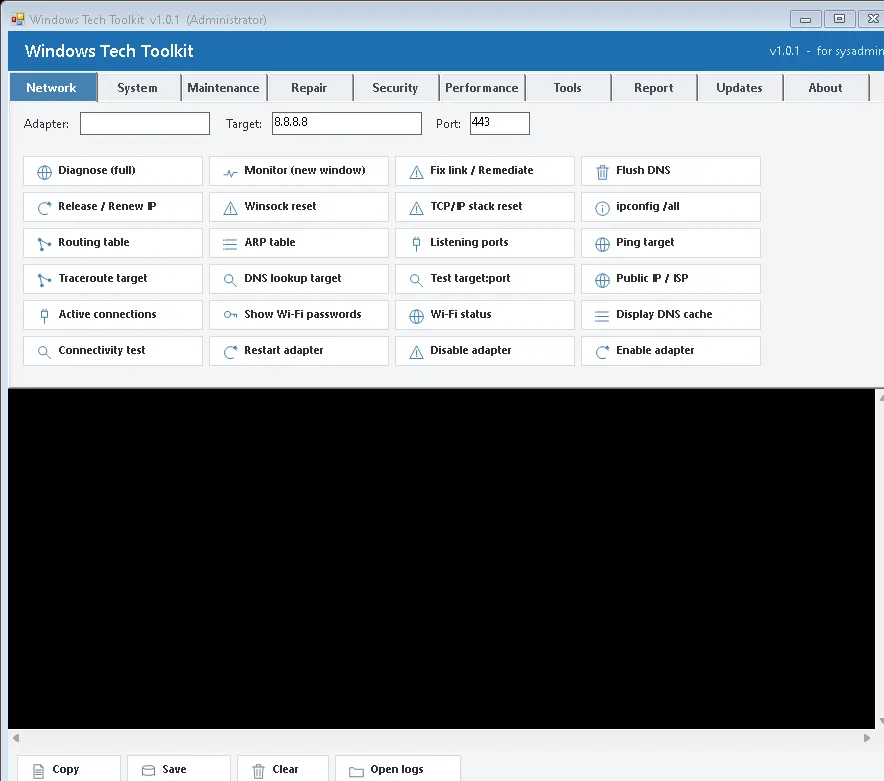
Installation and usage instructions are in the project README on GitHub.
Taken from the repository description.
v1.0.2 · 2026-09-02 · WinToolkit.exe
Notes of the latest release (v1.0.2), from GitHub:
Portable single-exe Windows admin console. Download WinToolkit.exe below and run it — it self-elevates, so expect a UAC prompt.
What changed
Logs no longer go to a hardcoded C:\Projects. Every path the toolkit wrote to was baked in from the machine it was developed on, so on any other PC it created a stray C:\Projects tree. Everything now lives under one per-user root, next to the scripts the exe already extracts there:
| Path | Contents | |---|---| | %LOCALAPPDATA%\WinToolkit\maintlogs | Maintenance transcripts, HTML health report | | %LOCALAPPDATA%\WinToolkit\netlogs | Network monitor transcript + link-change CSV | | %LOCALAPPDATA%\WinToolkit\driver-backup-<stamp | pnputil driver exports |
Report Open logs folder now opens that root instead of C:\Projects. Running a script directly, -LogDir still overrides.
The build works from a fresh clone again. The script-relative paths introduced in v1.0.1 never actually worked: $PSScriptRoot is not populated while param defaults are bound in PowerShell 5.1, so Build-WinToolkit.ps1 died on an empty Join-Path. It and Trust-WinToolkitCert.ps1 now resolve their paths in the script body.
Nothing else changed — same tabs, same actions.
Verify the download
Authenticode-signed with a self-signed certificate, so Windows still reports an unknown publisher. That is expected. Check this instead:
| | | |---|---| | SHA-256 | E6EB50968B604AC2A52C74186AD5AD89409061C8F4472D27990C2C5231548557
Windows fan monitoring and opt-in, verified fan control for the Gigabyte Z370 AORUS Gaming 7 (WPF, .NET 8, LibreHardwareMonitor, SQLite). Read-only by default.
Windows desktop app to switch DNS providers safely, benchmark resolvers, manage DNS profiles and troubleshoot DNS. WPF / .NET 10, local-only, no telemetry.
Unupunct's MacOS menu-bar utility hub. macOS 13 and later should open it.